
Pull Quotes
A technique traditional to print is the pull quote, a snippet of content that stands out from its surroundings to grab a reader’s attention as they scan pages.
Step 1: The HTML
For the pull quote basics, we can start with some HTML like the following:
<p>If ever there was ...[Big load of text]... humble pea is it.</p>

<p>Mother Nature has never created ...[Big load of text]... something so flawless.</p>

<aside class="pquote">
    <blockquote>
        <p>It is not an exaggeration to say that peas can be described as nothing less than perfect spheres of joy.</p>
    </blockquote>
</aside>

<p>The green seed ...[Big load of text]... favorite for good reason.</p>

<!-- ...and so on... -->
The new-to-HTML5 element aside is perfect for this scenario — we want to add a snippet of content but make it clear that this stands outside of the meaningful flow of the content surrounding it. Within the aside, the pull quote obviously being a quote makes the blockquote element another perfect choice.
Step 2: Floating The Quote
Now we want to take the box created by the aside element, pull it out of the visual flow and style it to stand out from the rest of the content:
.pquote {
    float: left;
    width: 100px;
    background: #ddf;
    font-weight: bold;
    padding: 13px;
    margin: 0 13px 13px 0;
}

blockquote {
    margin: 0; /* gets rid of the default blockquote margin */
}
See this basic pull quote in action.
Step 3: Adding Decoration
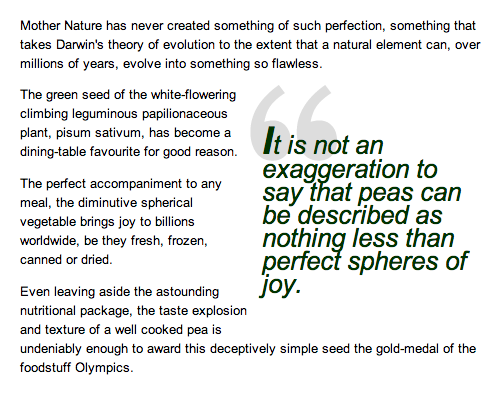
This is very simple CSS to give you an idea of how pull quotes can be easily achieved, but the sky is the limit — with a little more fiddling, something much more interesting can be achieved:
.pquote {
    float: right;
    width: 200px;
    background: url(images/openquote.gif) top left no-repeat;
    color: #030;
    font-size: 26px;
    line-height: 0.9;
    font-style: italic;
    padding: 13px;
}

blockquote {
    margin: 0;
}

.pquote p:first-letter {
    font-size: 39px;
    font-weight: bold;
}
A slightly more complex method would be to add more parts to the pull quote, such as a photograph or credit by using a bit more HTML:
<p>If ever there was ...[Big load of text]... humble pea is it.</p>

<p>Mother Nature has never created ...[Big load of text]... something so flawless.</p>

<aside class="quotebox">
    <blockquote>
        <p>"It is my educated opinion that this is complete and utter tosh."</p>
    </blockquote>
    <p class="by">Patrick Griffiths (pea farmer)</p>
</aside>

<p>The green seed ...[Big load of text]... favorite for good reason.</p>

<!-- etc. -->
Slightly different CSS, essentially following the same principles as the first two examples can look like this:
.quotebox {
    float: left;
    width: 200px;
    background: #900 url(images/ptg1.jpg) top no-repeat;
    color: #fc0;
    font-size: 12px;
    line-height: 1.2;
    padding-top: 71px;
    border: 2px solid #600;
    margin: 0 12px 12px 0;
}

.quotebox p {
    margin: 0;
}

.quotebox blockquote {
    font-weight: bold;
    padding: 6px;
    border-top: 2px solid #600;
    margin: 0;
}

.quotebox .by {
    padding: 6px;
}